
Record a Skill is rolling out in Copilot in PowerPoint, and it removes the biggest hurdle for anyone who wants to build a skill
Skills themselves are simple. They’re instructions Copilot follows for a specific task. But writing those instructions is where most people stall. We usually know what right looks like, and we know how to get a slide from where it starts to where we want it to end up. Writing that down as steps someone else could follow is a different job, and for a lot of people a daunting one.
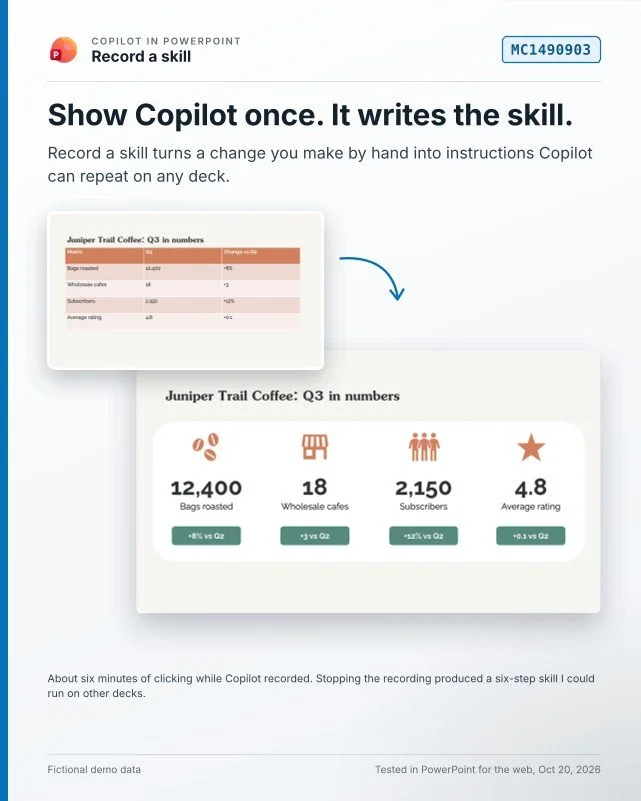
Record a skill (announced as MC1490903) turns that around. In the Copilot pane, go to Manage plugins & skills > Add > Record a skill and make the change yourself. When you stop, Copilot looks at what changed in the deck and drafts the name, description and instructions for you.
Copilot doesn't just record your clicks. It generalizes your changes into a pattern that can be applied more broadly and shows you the steps it noted in plain language so you can make any corrections if you need to. In this demo's case, it captured a skill to turn a table of information into a visually appealing set of cards with icons and stats.
I ran the new skill against three thematically distinct but visually similar slides. Copilot was able to apply this generalized logic to make an update stylistically close to what I wanted without losing the information that made each slide unique. This doesn't eliminate the need for hand edits in all cases, but it moves the creation process along in a standardized way.
For anyone who already uses PowerPoint in a more visual, creative way, this could be the first time skills feel worth the effort. If writing instructions has kept you away from skills so far, would you try recording one? And what would you record first?
First posted on Linkedin on 10/20/2026 → View Linkedin Post Here