
Structured Docs via Forms: Useful Feature, Strange Fit for a Copilot License
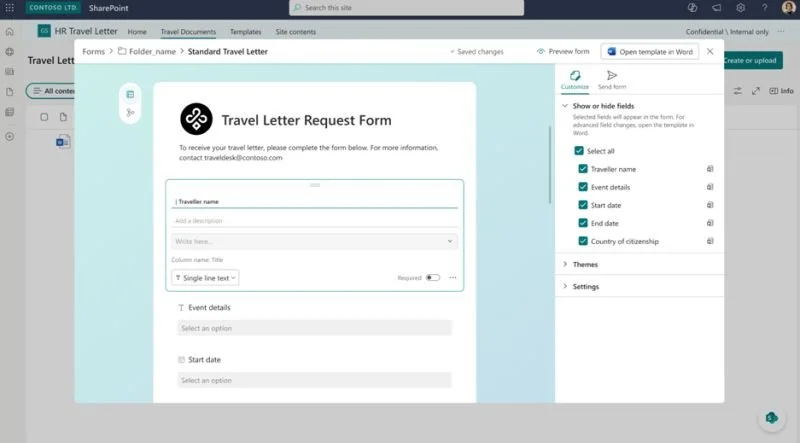
An intriguing new feature is coming for Microsoft 365 Copilot licensed users: Structured document generation with Forms.
You'll be able to create workflows where a user submits data using a form and this automatically generates a document in a connected SharePoint library based on a template. It will be rolling out to GA next month according to MC1218000, so no Frontier step along the way first.
This seems like a really useful feature, but my initial response was "What has this got to do with Microsoft 365 Copilot?". Digging into the Message center post, this becomes clear, it seems Copilot will suggest the fields to be populated from the form - so a license is needed for the form creator NOT those who end up using the form.
A running gag is that Copilot is just Clippy in disguise, and I have to say that when I read this, I did wonder whether this was strikingly similar to help I could have gotten on creating a mail merge in Word 97. In my mind this seems like a feature distinctly absent of the cutting-edge AI magic of 2026 and an odd choice to lock behind a Microsoft 365 Copilot license paywall.
One of the drumbeats of anxiety of the Copilot age is organizations with a long-term history of using Microsoft 365 that haven't rolled out M365 Copilot to their whole team worrying that all the wind in the sails of developing M365 (non-Copilot) will be redirected. So far, this largely doesn't seem to have been the case, but this is the first feature I recall where it at least reads as something squarely non-Copilot sprinkled with a little AI to shove it into that license.
The reality is this though. While a neat Forms to document pipeline is fantastic, creating structured documents is not new, and is something we can already do, albeit seemingly with a little more complication, in every tenant. If what adding Microsoft 365 Copilot brings is convenience, then perhaps that alone is well worth the investment.
First posted on Linkedin on 01/17/2026 -> View Linkedin Post Here