
Yesterday, I made a bad technology decision. And it goes to show just how easy it is to be led off track when you step outside your lane of expertise to just move something forward quickly.
Since establishing Bright Ideas Agency over 4-years ago, I have used QuickBooks Self Employed (QBSE) to issue monthly invoices to my clients. This has worked great, but it comes with a significant limitation - this cut down QuickBooks Online (QBO) edition can only be accessed by a single user. Now, with a continuously growing client list, I've been looking for ways to better scale my time; invoicing is a logical place to do this, so I needed a way to give access securely to another user.
QuickBooks is a SaaS product, so it offers upgrade paths between its product tiers, I settled on the Essential package, which offers 3 paid seats, and is a 3x increase in price. I then went ahead and hit the upgrade button.
I know QuickBooks fairly well as I've helped clients with it in the past, and I know that QBSE is a pretty different product than full QBO, there are a lot of full accounting package features that aren't exposed there and the way tasks like transaction mapping happen seem very different on the surface. However, if Intuit, the maker of the software, sells this as an easy upgrade, why should I worry?
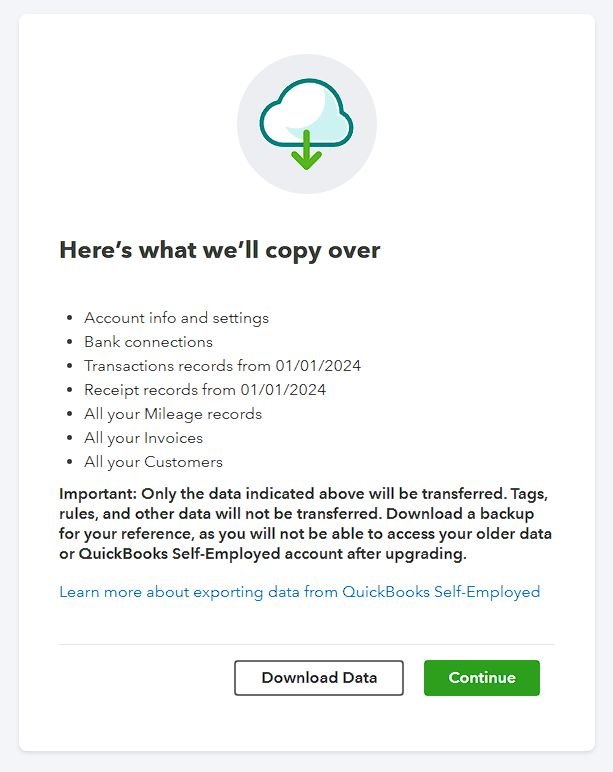
Upon upgrading they showed me a warning, only certain data would sync. I already had backups of everything, so this could be somewhat inconvenient - it's nice to have historical reports for example - but not a dealbreaker. I went ahead.
And upon opening my shiny new QBO Essentials account: shock. My bank links were inactivated, my transactions weren't appearing, and even my invoices and related payments (all done through QuickBooks) weren't mapping properly to logical registers on the Chart of Accounts.
So, I fired up a chat with tech support to explain the problem. I needed to know if this was expected behavior, and if so, how to fix it. Were they able to offer any help? No. Were they able to offer to set me up for another subscription to have one of their "Experts" fix my broken books? They sure were.
I declined. Upon some further research, I learned this is a known problem many have run into. I fixed 2025 as best I could and got it into a state to send out some invoices for November. It's the end of the year, and from January I'll be starting afresh with Xero, or Zoho Books, or another product someone here might recommend.
The lesson I learned? With Microsoft 365, I advocate for doing research and learning about features before pressing the button to activate them. In QuickBooks, I forgot my own advice and just wanted to get something moving quickly. It's easy to do, but the clean-up from inadvertently rolling out a feature poorly or without planning can have lasting impact.
What "easy upgrade" horror stories have you run into?
First Posted on Linkedin on 12/03/2025 -> View Linkedin Post Here