
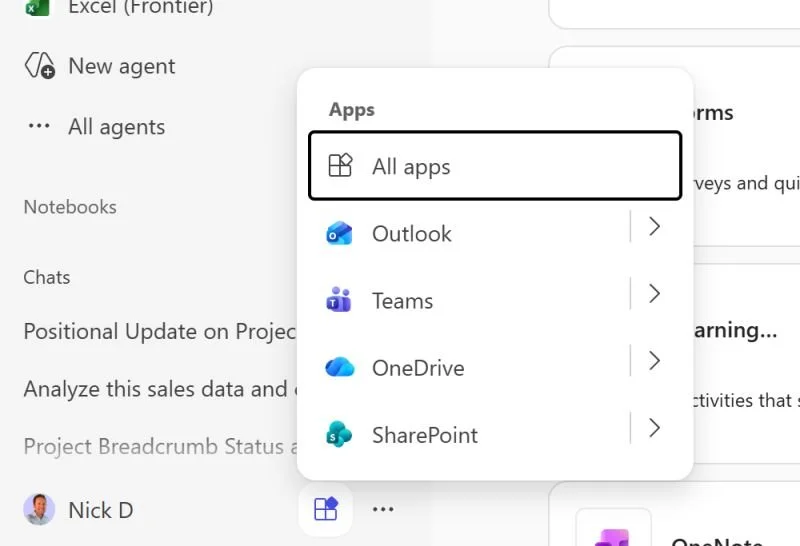
Am I missing something, or is there no longer a way to pin a D365 app to the app rail in Microsoft 365 Copilot?
The interface moved around again, and now your apps - any that you've pinned - will appear in this kind of start button menu at the bottom of your Microsoft 365 Copilot app interface. But conspicuously missing is my previously pinned D365 I use to wrap up project invoices each month.
As a tech enthusiast, I think it's a useful experience for the UI to stump me on occasion. Very often I'll chat with less tech-excited workers in client companies who regularly lose time due to UX changes. While it's easy for me to sympathize, having just skipped over the changes myself, it's difficult to fully empathize. A change that does just leave me scratching my head for a while is good for my soul as a technology consultant.
The question is though that for both those who have no tech-excitement and the most tech-excited, is it actually necessary to keep moving all these pieces around so much? There is much of the core Microsoft 365 apps that have remained very similar over a decade or more, and they are still extremely useable. Yet, the Microsoft 365 Copilot app seems to undergo fairly profound change every couple of months.
Web-based SaaS has opened up many doors for technology, but it's also raised the potential for over-eager rearranging of the deck chairs in terms of UI. At what point does UX innovation just amplify a lack of long-term planning? And can someone help me find out how to pin my D365 app so I can go back to not thinking about these things?
First posted on Linkedin on 12/02/2025 -> View Linkedin Post Here