
Lightweight Tools on Copilot Pages: Frontier’s Most Practical Superpower
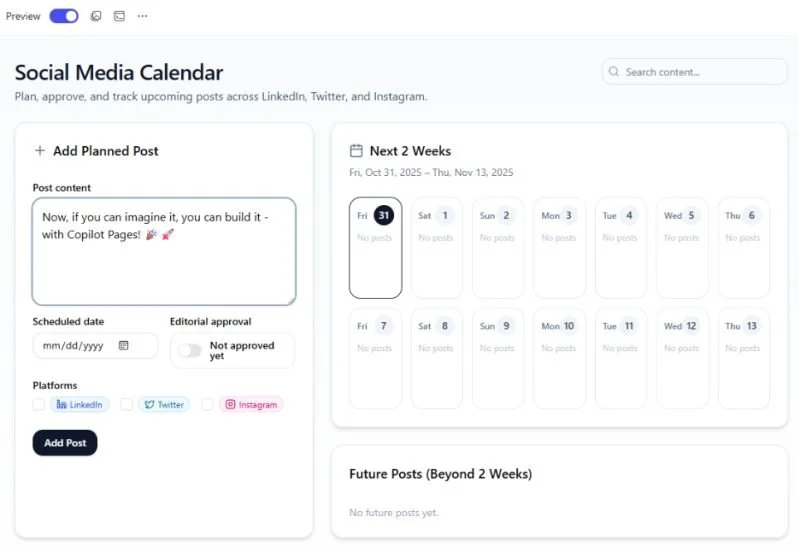
Frontier program users with Microsoft 365 Copilot can now build lightweight code-based tools in the context of a Copilot Page.
The blog post for this feature focuses on use cases like building app prototypes, but the reality is that most of us are not working in tech companies where building apps is our focus. For most business users, the benefit here is to build tools that help us to think through problems, a digital corollary of a jig a carpenter might quickly fabricate to help them get a difficult cut consistent on a specific job.
Last week I met with a CEO who was using a similar tool on another platform with his company's sales data to quickly visualize the impact of different changes on next year's performance. The AI-generated tool gave him sliders for key metrics so he could think through different scenarios. This was a somewhat throwaway tool to spark new ideas, not a production dashboard to be shared across the company.
Most business users have never had a time efficient way to integrate custom tools in their flow of work like this. And I think if deployed in the right way, this opportunity could be one of the most transformative aspects of how AI can help human workers flourish in new ways.
If you have access to the Frontier Program and Microsoft 365 Copilot, you should be able to try this today by turning on GPT-5 in Copilot Chat and using a suitable prompt like, "Create an interactive, in-memory-only app to evaluate vendors after each project. The app should allow users to rate vendors on criteria such as delivery time, quality, and communication. Each evaluation should be associated with a specific project and reviewer."
Do you think this type of capability can change work?
First posted on Linkedin on 11/30/2025 -> View Linkedin Post Here