
Who can see Copilot Cowork in your organization?
Now that Copilot Cowork is GA, access to it is gated not by Frontier Program entitlement but by having a spending policy in place that applies to the user. However, if you only want Cowork to be visible to Microsoft 365 Copilot licensed users who have been allocated to a spending policy, you need to ensure your Copilot settings are configured correctly.
The default behavior seems to be that Cowork is visible in the UI for any user with a Microsoft 365 Copilot license (the Cowork-eligible status), and this appears to be rolling out to all such users, whether or not they were part of your Frontier group with access to Cowork.
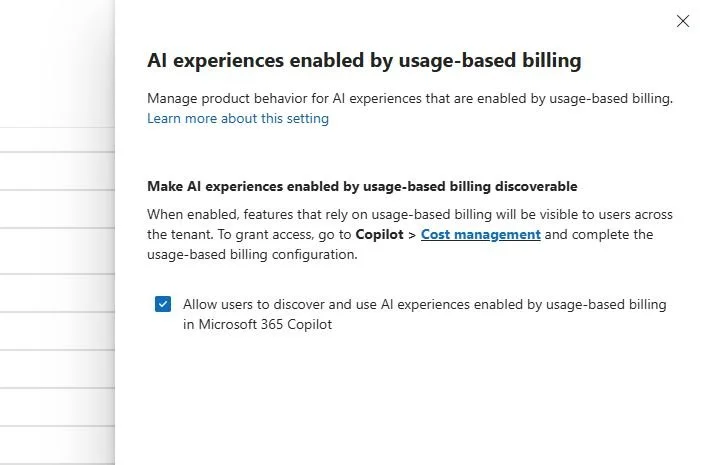
This visibility seems to no longer be controlled by access to the Cowork agent in the agent registry, but instead is linked to the "AI experiences enabled by usage-based billing" Copilot setting. And visibility follows feature eligibility, not feature enablement through assignment of a spending policy when this setting is activated.
The distinction here is important, as Cowork visibility for users outside of a spending policy includes access to a "Request access" workflow which may be out of keeping with what you require in your environment. I also am not sure where those requests flow to currently - they don't seem to appear in the license requests interface in MAC and there does not appear to be an equivalent interface under Copilot Cost Management.
For users with Frontier access (through June 30) or, my expectation would be, for users for whom a spending policy kicks in on July 1, even with usage-based billing visibility turned off tenant-wide, Cowork still shows as available in the Copilot UI.
My recommendation: If you are still working out your approach to budgeting for Cowork, turn this setting off or else Cowork will be (or may be already) being shown to your users every time they access Copilot Chat.
First posted on Linkedin on 07/01/2026 → View Linkedin Post Here